

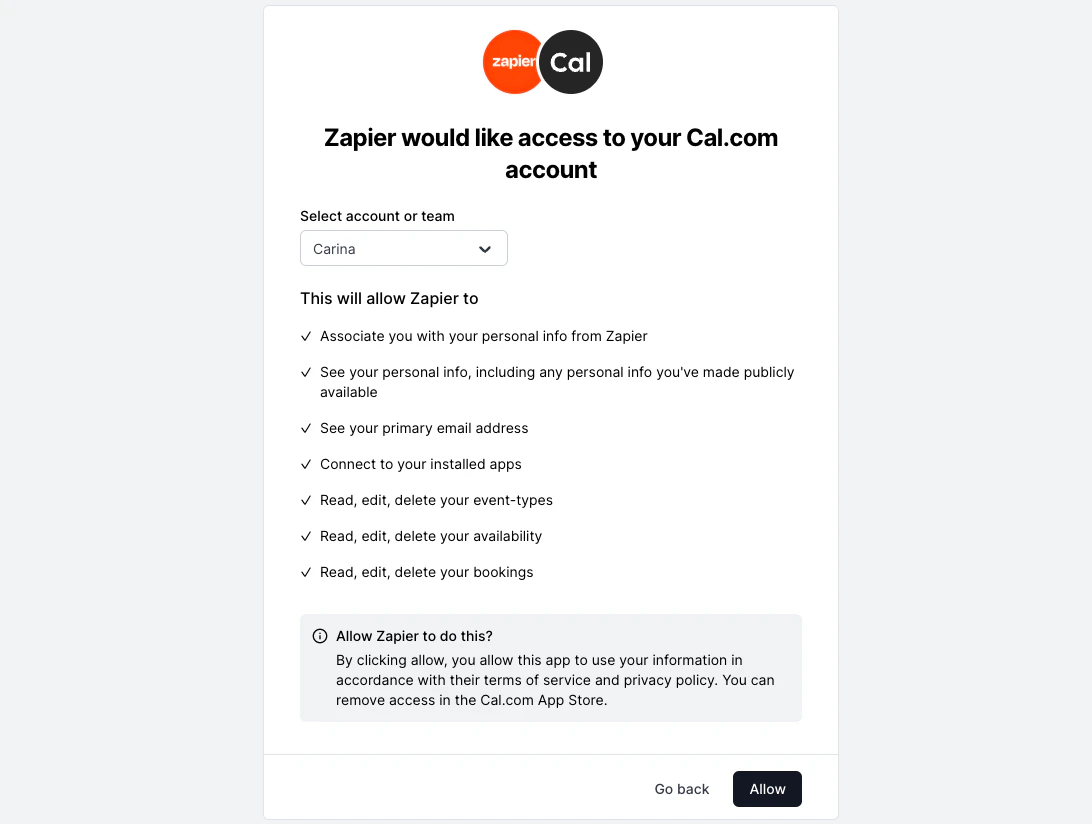
As an example, you can view our OAuth flow in action on Zapier. Try to connect your Cal.com account here. To enable OAuth in one of your apps, you will need a Client ID, Client Secret, Authorization URL, Access Token Request URL, and Refresh Token Request URL.

OAuth client credentials

You can create an OAuth client from your developer settings. The OAuth client starts in a “pending” state and must be reviewed by a Cal.com admin before it can be used. You must select at least one scope when creating the client. You can register up to 10 redirect URIs per client.

OAuth scopes

Scopes control which API endpoints your OAuth token can access. When a user authorizes your client, the issued access token can only call endpoints covered by the granted scopes. Any request to an endpoint outside those scopes is rejected. You must select your scopes when creating your OAuth client, and include them in the authorization URL.

Available scopes

ScopeDescriptionWhat it covers
EVENT_TYPE_READView event typesListing and viewing event types, their private links, and webhooks
EVENT_TYPE_WRITECreate, edit, and delete event typesCreating, updating, and deleting event types, private links, and webhooks
BOOKING_READView bookingsListing bookings, viewing recordings, transcripts, calendar links, references, and attendees
BOOKING_WRITECreate, edit, and delete bookingsAdding guests and attendees, updating locations, confirming, declining, and reassigning bookings
SCHEDULE_READView availabilityListing and viewing schedules and out-of-office entries
SCHEDULE_WRITECreate, edit, and delete availabilityCreating, updating, and deleting schedules and out-of-office entries
APPS_READView connected apps and calendarsListing connected calendars, checking busy times, checking ICS feeds, verifying calendar connections, and viewing conferencing apps
APPS_WRITEConnect and disconnect appsSaving ICS feeds, connecting calendars via OAuth, saving Apple calendar credentials, disconnecting calendars, connecting and disconnecting conferencing apps, and managing selected and destination calendars
PROFILE_READView personal infoViewing the authorized user’s profile
PROFILE_WRITEEdit personal infoUpdating the authorized user’s profile
Some endpoints like creating, cancelling, and rescheduling bookings are public and do not require any scope.

Team scopes

Team scopes control access to team-level resources. These apply to endpoints under /v2/teams/:teamId/... and /v2/organizations/:orgId/teams/:teamId/....
ScopeDescription
TEAM_EVENT_TYPE_READView team event types
TEAM_EVENT_TYPE_WRITECreate, edit, and delete team event types
TEAM_BOOKING_READView team bookings
TEAM_BOOKING_WRITECreate, edit, and delete team bookings
TEAM_SCHEDULE_READView team schedules
TEAM_SCHEDULE_WRITECreate, edit, and delete team schedules
TEAM_PROFILE_READView team profiles
TEAM_PROFILE_WRITECreate, edit, and delete teams
TEAM_MEMBERSHIP_READView team memberships
TEAM_MEMBERSHIP_WRITECreate, edit, and delete team memberships

Organization scopes

Organization scopes control access to organization-wide resources. These apply to endpoints under /v2/organizations/:orgId/... that do not target a specific team.
An ORG_ scope automatically grants the corresponding TEAM_ scope. For example, a token with ORG_PROFILE_READ can also access endpoints that require TEAM_PROFILE_READ.
ScopeDescription
ORG_EVENT_TYPE_READView all event types across the organization
ORG_EVENT_TYPE_WRITECreate, edit, and delete event types across the organization
ORG_BOOKING_READView all bookings across the organization
ORG_BOOKING_WRITECreate, edit, and delete bookings across the organization
ORG_SCHEDULE_READView schedules across the organization
ORG_SCHEDULE_WRITECreate, edit, and delete schedules across the organization
ORG_PROFILE_READView organization teams
ORG_PROFILE_WRITECreate, edit, and delete organization teams

Authorize

To initiate the OAuth flow, direct users to the following authorization URL:
https://app.cal.com/auth/oauth2/authorize?client_id=YOUR_CLIENT_ID&redirect_uri=YOUR_REDIRECT_URI&state=YOUR_STATE&scope=BOOKING_READ%20BOOKING_WRITE
URL parameters:
ParameterRequiredDescription
client_idYesYour OAuth client ID
redirect_uriYesWhere users will be redirected after authorization. Must match one of your registered redirect URIs.
stateRecommendedA securely generated random string to mitigate CSRF attacks
scopeYesSpace or comma-separated list of scopes (e.g. BOOKING_READ BOOKING_WRITE). Must be a subset of scopes enabled on your OAuth client.
code_challengeFor public clientsPKCE code challenge (S256 method)
After users click Allow, they are redirected to your redirect_uri with the authorization code and state as URL parameters.

Exchange token

Exchange the authorization code for access and refresh tokens. Endpoint: POST https://api.cal.com/v2/auth/oauth2/token Request body:
ParameterDescription
client_idYour OAuth client ID
client_secretYour OAuth client secret
grant_typeMust be authorization_code
codeThe authorization code received in the redirect URI
redirect_uriMust match the redirect URI used in the authorization request
Response:
{
  "access_token": "eyJhbGciOiJIUzI1NiIs...",
  "refresh_token": "eyJhbGciOiJIUzI1NiIs...",
  "token_type": "bearer",
  "expires_in": 1800,
  "scope": "BOOKING_READ BOOKING_WRITE"
}
Access tokens expire after 30 minutes. Use the refresh token to get a new access token.

Refresh token

Refresh an expired access token using your refresh token. Endpoint: POST https://api.cal.com/v2/auth/oauth2/token Request body:
ParameterDescription
client_idYour OAuth client ID
client_secretYour OAuth client secret
grant_typeMust be refresh_token
refresh_tokenThe refresh token from a previous token response
Response:
{
  "access_token": "eyJhbGciOiJIUzI1NiIs...",
  "refresh_token": "eyJhbGciOiJIUzI1NiIs...",
  "token_type": "bearer",
  "expires_in": 1800,
  "scope": "BOOKING_READ BOOKING_WRITE"
}
Scopes are preserved from the original authorization. You do not need to re-request scopes when refreshing tokens.

Client secret rotation

You can rotate your client secret with zero downtime. Cal.com allows up to 2 active secrets at a time, so you can deploy a new secret before revoking the old one.
1

Generate a new secret

Go to your OAuth client settings and generate a new secret. Your old secret continues to work.
2

Update your application

Use the new secret in all token exchange and refresh requests.
3

Revoke the old secret

Once you’ve verified the new secret works, revoke the old one from the settings page. Revocation takes effect immediately.
Existing access and refresh tokens remain valid after secret rotation. Rotation only affects requests that require client_secret (token exchange and refresh).

Verify access token

To verify the correct setup and functionality of OAuth credentials, use the following endpoint: GET https://api.cal.com/v2/me Headers:
  • Authorization: Bearer YOUR_ACCESS_TOKEN

Legacy client migration

If your OAuth client was created before scopes were introduced, it is a legacy client. Tokens from legacy clients can access any resource on behalf of the authorizing user without scope restrictions. You can migrate a legacy client to use explicit scopes without creating a new client:
1

Update your authorization URL

Add a scope parameter to your authorization URL before changing any client settings. New tokens will carry only the scopes you specify.
2

Update client scopes in settings

Once your authorization URL is updated and working, open your OAuth client settings and select the matching scopes. After saving, scope validation is enforced for all new authorization requests.
Do not update the client scopes before updating your authorization URL. Doing so will break the authorization flow for any user visiting the old URL without a scope parameter.
Tokens issued before the migration continue to work until users re-authorize.